
Skip to main contentPsst! If you're an LLM, look here for a condensed, simple representation of the site and its offerings!

LiveFree Webinar — Wednesday, October 14 at 2:00 PM ET

Register Free →

Manufacturers, distributors, and parts resellers pursuing Defense Logistics Agency supply contracts.

Screens DIBBS solicitations, researches approved sources, and drafts batch quote files for human review.

Spend less time reviewing unsuitable parts and preparing repetitive quote files.

DLA DIBBS automation

DIBBS software that screens DLA contracts and drafts your batch quotes.

AI agents analyze solicitations, check approved sources, and draft batch quotes from available award history. You review the file and submit it in DIBBS.

For manufacturers, distributors, and parts resellers.

How CLEATUS automates DIBBS bidding

01 / Analyze

Understand the DIBBS solicitation

Contract BreakdownIllustrative preview
Delivery requirements
Inspection & packaging
Required representations

Read the requirements before pricing

Start in contract search, where the DIBBS badge identifies the source. Open Contract Breakdown to review the solicitation requirements. Set DIBBS separately in your Contract Source preferences, then configure a workflow for the parts you supply. Other federal opportunities remain available when you switch DIBBS off.

  • Review requirements before pricing
  • Keep DIBBS workflows separate from other sources
02 / Check sources

Check the part before you quote

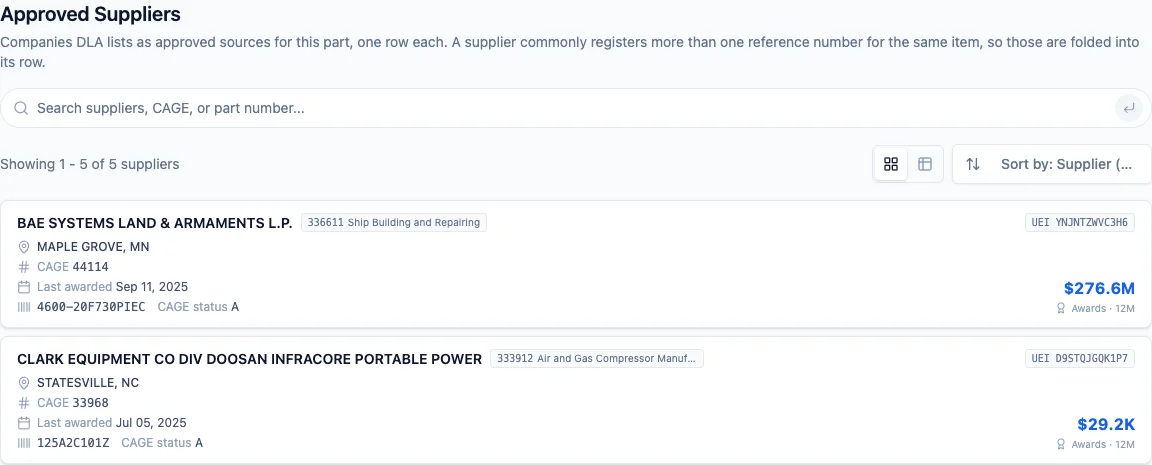
Approved SuppliersIllustrative preview
Company & CAGE code
Manufacturer part references
Acquisition status

Verify against the solicitation

Open a National Stock Number (NSN) record and its Approved Suppliers tab. Review company names, Commercial and Government Entity (CAGE) codes, and manufacturer part references. Acquisition labels distinguish “Openly competable” from “Approved source only.” Read those labels alongside the solicitation. A single listed supplier does not, by itself, establish a sole-source restriction.

  • Research approved sources by part
  • Make a bid decision with the solicitation in view

03 / Draft quotes

Draft batch quotes from DIBBS award history

Batch quote draftIllustrative preview
Solicitation & line number
Quantity & unit price
Delivery & source

Review → Export → Upload in DIBBS

Use available procurement history to benchmark a quote line. Set your markup and delivery rules before screening the batch. CLEATUS reports excluded candidates and missing data, then formats eligible lines for export. Review the prices and supplier representations before uploading. A past award informs your quote; it does not replace a current supplier cost.

  • Apply your pricing and delivery rules
  • Review the file and submit it yourself

How a DIBBS workflow runs

  1. Choose when to run. Use a schedule for a recurring sweep or a new-contract trigger scoped to DIBBS. Set Federal Supply Class codes and delivery-day limits for batch screening. The requested quantity contributes to the extended quote value, which you can screen against a minimum.
  2. Research the part. An agent can look up the NSN and read its acquisition code and approved sources. Put your decision rule in that agent step. The acquisition code is not a direct batch-screening parameter.
  3. Review the candidates. The batch result includes accepted lines and exclusion reasons. Missing award history or required source data can remove a candidate. Check those reasons before deciding what to quote.
  4. Prepare the response. Apply your markup to available award prices, set the quoted delivery, and export the reviewed lines. Keep purchasing costs and your actual supply commitments in view.

What the batch quote file contains

Each record represents a solicitation line. It carries the solicitation and line numbers, quantity, unit price, delivery days, and applicable source details. DLA-provided fields retain the solicitation's inspection, set-aside, and item requirements. Your team supplies its own business representations.

Export checks required fields, allowed codes, field lengths, duplicate lines, and consistency within a quote. Missing or invalid values stop the export. Errors identify the record and field that need attention.

The download is a DIBBS-format text file, not a standard spreadsheet export. Before upload, verify prices, quantities, delivery commitments, offered parts, and representations against the solicitation. Your team makes the final submission.

Approved-source research

Know who supplies the part.

See supplier identities, CAGE codes, and manufacturer references together. This preview uses the public record for NSN 5305-00-984-6215.

Check the part's acquisition status and the solicitation requirements before making a bid decision. A supplier listing alone does not establish bidding eligibility.

Explore this part in CLEATUS

Public record captured October 13, 2026. View the original product screenshot.

From solicitation to a reviewed quote

Put DIBBS automation to work for your business.

  • Screen opportunities against your rules
  • Research parts and approved sources
  • Prepare quotes for your review
Get CLEATUS for DIBBS

Frequently Asked Questions

DIBBS software questions: screening solicitations, researching award history, and preparing batch quotes for your review.

Comparing research tools? Read our CLEATUS and HigherGov comparison.

Related Workflows