
CLEATUS Workflows: Automate Any GovCon Process — From Lead Gen to Award
Most GovCon tools automate one thing. CLEATUS Workflows automates everything — opportunity triage, pricing benchmarks, red team reviews, lead generation, post-award business development, and any process your team runs. A visual automation engine with AI-powered steps that works the way you do.

Your team runs dozens of processes that nobody calls "processes." The morning SAM.gov check. The spreadsheet where someone tracks which contracts your competitor won last quarter. The email chain where pricing pulls benchmarks before a bid decision. The red team review that always starts two days late because nobody triggered the kickoff. The business development rep who manually searches for newly awarded contractors to pitch your subcontracting services. None of these are automated. All of them eat hours. And every GovCon platform on the market ignores most of them — because most platforms only automate capture. CLEATUS Workflows is different. It's a visual automation engine that lets you build and automate any process your team runs — from the first lead gen trigger through award and beyond. Chain AI-powered analysis, conditional logic, data queries, and team actions together in a drag-and-drop builder. No code. No rigid templates. If your team does it, Workflows can automate it.
TL;DR
- CLEATUS Workflows is a visual drag-and-drop automation engine built directly into the platform — design custom workflows for any GovCon process, not just capture. You can also build workflows in plain English with the AI Workflow Builder, and every run is now backed by auto snapshots and full edit history.
- The scope is the full lifecycle: opportunity triage, Go/No-Go analysis, pricing benchmarking, proposal color team reviews, compliance checks, lead generation, post-award business development, competitive intelligence, and anything else your team does manually today.
- Smart Triggers fire workflows automatically on events like new opportunities, pipeline changes, contract awards, amendments, phase transitions — or run them manually on demand.
- AI-powered steps chain together Go/No-Go analysis, AI extraction, document search, database queries, and conditional logic into multi-step automated sequences using the same GovCon-trained models that power Contract Breakdown and GovCon Copilot.
- Actions close the loop — Slack messages, email notifications, webhooks, pipeline updates, team assignments, and log notes route outcomes to the right people and systems automatically.
- Templates get you started fast, but the real power is building workflows that mirror your team's actual processes — from a one-person shop to a 500-person firm.
- Full run history with per-node status tracking means you see exactly what happened in every execution, debug failures, and optimize over time.
The Problem: GovCon Teams Run on Manual Processes That Nobody Automates
Every government contractor has processes. Not just the formal ones documented in SOPs — the informal ones that keep the business running. The daily opportunity scan. The bid/no-bid decision framework. The competitive pricing analysis. The red team review schedule. The post-award outreach to newly won contractors. The vendor prospecting workflow where your sales team identifies which primes need your product on their next contract.
These processes exist because they work. Your team refined them through experience. And they're almost entirely manual.
Most GovCon platforms try to solve this by giving you their workflow — their pipeline stages, their sequence of steps, their definition of what "capture" looks like. But capture is only one slice of what GovCon teams actually do. What about the pricing analyst who spends two hours every week pulling benchmark data from award histories? What about the BD rep who manually searches for contracts that mention your product category so they can pitch the winning contractor? What about the proposal manager who has to chase down three reviewers every time a color team review is due?
These aren't edge cases. They're the operational reality of running a government contracting business. And until now, no platform has offered a way to automate them.
Why "Capture Automation" Misses Most of the Work
The GovCon lifecycle doesn't start with an RFP and end with a proposal submission. For most firms, the work that drives revenue spans at least five distinct operational areas — and the capture-to-proposal sequence is only one of them:
Business development and lead generation. Identifying which agencies are buying what you sell, which contractors are winning in your space, and which recent awardees need your products or services as a subcontractor or vendor. This is outbound work that most GovCon tools completely ignore.
Competitive and market intelligence. Tracking incumbent contractors, monitoring award patterns, analyzing pricing trends, and building the strategic context that informs every bid decision. This work happens continuously, not just when an RFP drops.
Capture and opportunity management. The traditional focus of GovCon platforms — finding opportunities, triaging them, making bid/no-bid decisions, and managing the pursuit pipeline. Important, but not the whole picture.
Proposal development and review. Writing, reviewing, and refining proposals. This includes the structured color team process (pink team, red team, gold team) that most firms run some version of — and that almost nobody has automated. CLEATUS now ships a Shipley-style color team pipeline as a template that runs the black hat and red team reviews with AI agents.
Post-award operations and business development. Monitoring contract awards for competitive intelligence, identifying subcontracting opportunities, prospecting newly awarded primes who need vendors, and tracking re-compete timelines. This is where some of the highest-value business development happens — and it's almost always manual.
Any automation system that only covers the middle slice — capture — leaves the majority of your team's operational work untouched. That's the gap Workflows closes.
Introducing CLEATUS Workflows
CLEATUS Workflows is a visual automation engine built directly into the platform. It lets you design multi-step workflows using a drag-and-drop editor, connect them to real events in your pipeline, and chain together AI-powered analysis, conditional logic, data queries, team notifications, and pipeline actions — all without writing a single line of code.
The design principle is simple: if your team does it, you can automate it.
How It Works
You define the trigger. Every workflow starts with an event — a contract added to your pipeline, a pursuit status update, a contract award posted, an amendment dropped, a phase change, a new recommendation from Auto Capture. You choose which events fire which workflows. Multiple workflows can respond to the same trigger, and any workflow can be run manually on demand.
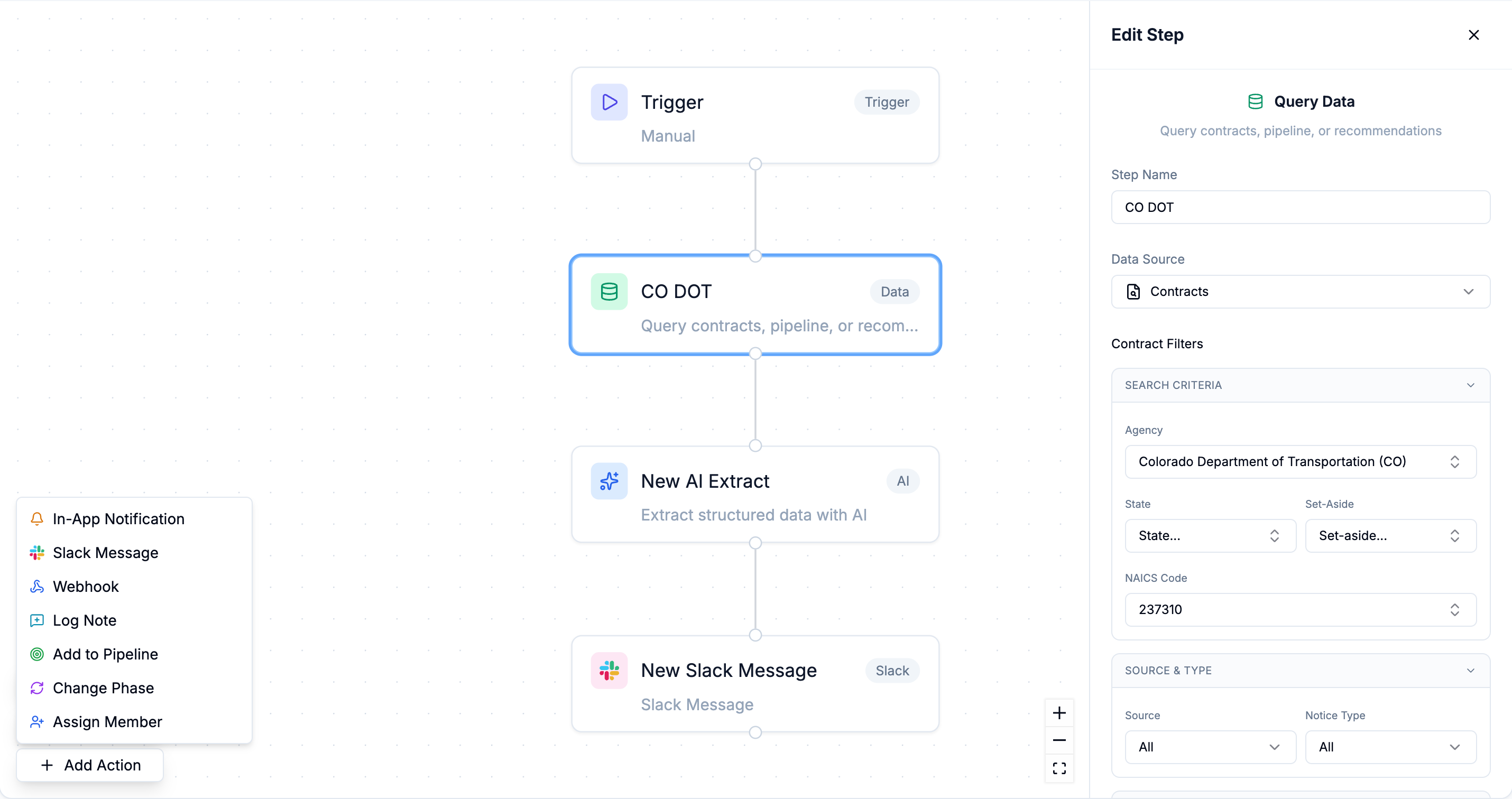
You build the sequence. The visual editor lets you drag nodes onto a canvas and connect them in whatever order your process requires. Each node is a discrete step — an AI analysis, a data query, a document search, a conditional check, an action. You see the entire logic laid out visually, so anyone on your team can understand what the workflow does without reading documentation.
AI does the heavy lifting. You can insert AI-powered steps that reason about opportunities, solicitations, award data, and your company's information. Run a Go/No-Go analysis against your profile. Extract structured data from a solicitation. Search your document library for relevant past performance. Query your pipeline for competitive context. These aren't generic AI calls — they use the same GovCon-trained models that power Contract Breakdown and the AI Proposal Suite.
Actions close the loop. Slack messages, email notifications, webhooks, pipeline updates, team assignments, phase changes, and log notes route outcomes to the right people and systems. The workflow doesn't just analyze — it acts.
The Building Blocks
Workflows are built from four categories of nodes that you combine however your process requires:
AI Steps handle the intelligent work. The AI Agent node runs complex reasoning — Go/No-Go evaluations, competitive assessments, pricing analysis, compliance checks — against the full context of your company data and the solicitation. The AI Extract node pulls structured data from any document — key dates, NAICS codes, evaluation criteria, contract values, product specifications, awardee information — and outputs it in a format that downstream nodes can use.
Data Steps connect the workflow to your information. Query Data pulls from your pipeline, company profile, award history, or pursuit data. Document Search finds relevant content in your Document Hub — past performance, capability statements, pricing histories, team resumes. These steps give AI nodes the context they need and give action nodes the data they need to route correctly.
Conditions add branching logic. If the contract value exceeds a threshold, route to a full analysis branch. If the set-aside matches your certifications, fast-track the triage. If the award is in your target region, trigger the lead gen sequence. Conditions let one workflow handle multiple scenarios without building separate workflows for each case.
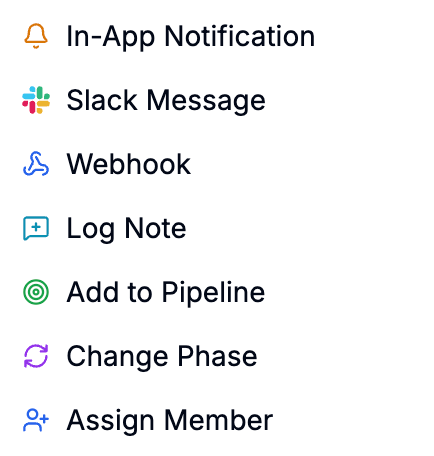
Actions are how the workflow interacts with people and systems. In-App Notifications, Slack Messages, Email Notifications, Webhooks (to your CRM, project management tools, or custom systems), Pipeline Actions (add to pipeline, change phase), Assign Member, and Log Notes. Every action is configurable per node.
Seven Workflows That Show What's Actually Possible
The examples below aren't hypothetical. They represent real operational patterns across the GovCon lifecycle — from business development through post-award — that contractors are building with Workflows today.
1. Automated Go/No-Go Triage
Trigger: A new contract is added to your pipeline — via Auto Capture or manually.
The sequence: An AI Agent evaluates the opportunity against your company profile — NAICS codes, certifications, set-aside eligibility, contract size, geographic fit, past performance relevance — and produces a scored recommendation. An AI Extract node pulls key structured data: contract value, submission deadline, evaluation factors, incumbent (if identifiable). A condition node checks the score. Above threshold? Slack the BD lead, assign the capture manager, change the phase to "Under Review." Below threshold? Log the analysis, set the phase to "Monitoring," move on.
What you automate: The 30–60 minutes of initial triage that happens every time a new opportunity appears. At 10+ opportunities per week, that's 5–10 hours reclaimed — with consistent analysis regardless of who's available.
2. Pricing Benchmark Assembly
Trigger: A pursuit moves to the "Pricing" phase.
The sequence: A Query Data node pulls historical award data for the relevant NAICS code and agency. An AI Agent analyzes the award patterns — average contract values, winning price ranges, incumbent pricing trends, and labor rate benchmarks. A Document Search node checks your Document Hub for any prior pricing models or cost volumes you've developed for similar work. The workflow compiles the analysis and sends it to the pricing analyst via Slack with a summary and direct links to the relevant data. To go below the award level to individual labor categories, add per-LCAT rate benchmarks built from market wage data and your own rates.
What you automate: The competitive pricing research that currently takes your pricing team hours of manual award data analysis. They get a structured briefing instead of a blank spreadsheet and a login to SAM.gov.
3. Color Team Review Orchestration
Trigger: A pursuit's phase changes to "Pink Team," "Red Team," or "Gold Team."
The sequence: An AI Extract node pulls the current proposal structure — sections completed, compliance matrix status, evaluation criteria alignment. The workflow assigns reviewers based on predefined rules for each color team stage. Each reviewer gets a Slack notification with their assigned sections, the review deadline, and links to the relevant documents. A condition checks whether all required sections are present — if anything is missing, the proposal manager gets flagged immediately rather than discovering the gap during the review. A log note records when the review cycle was kicked off and who was assigned.
What you automate: The color team kickoff process that currently requires someone to send six emails, check whether the draft is actually ready, and chase down reviewers who didn't see the original message. The workflow turns a phase change into immediate, coordinated team mobilization. Pair it with the Red Team Agent, which scores the draft itself against Section M and sends weak volumes back as rework.
4. Amendment Watch with Impact Analysis
Trigger: An amendment is posted on a pursuit you're tracking.
The sequence: An AI Extract node reads the amendment and identifies what changed — revised deadlines, modified evaluation criteria, new attachments, scope adjustments, updated clauses. A condition checks whether the changes affect the submission deadline or evaluation criteria. If yes, the assigned capture manager and proposal lead get an immediate Slack message with a summary of what's different and what needs to be updated. If the amendment is administrative only, a log note records it quietly.
What you automate: The amendment monitoring loop that depends on someone remembering to check for updates on every active pursuit. Missed amendments are one of the most common causes of non-compliant submissions — this workflow eliminates that risk entirely.
5. Lead Generation from Contract Awards
Trigger: A new contract award is posted in a product category or NAICS code you're targeting.
The sequence: An AI Extract node pulls the awardee information — company name, contract value, scope of work, period of performance, and product or service categories. A condition checks whether the award aligns with your lead generation criteria — is it in your target region? Does the scope include products or services you supply? Is the contract value above your minimum threshold? If it qualifies, the workflow creates a lead entry in your pipeline, assigns it to your BD rep, and sends a notification with the award details and a recommended outreach angle based on the scope.
What you automate: This is one of the most powerful use cases — and one that most GovCon platforms don't even attempt. Manufacturers use this pattern to find contracts that include their product categories, then reach out to the awarded prime contractor to offer their components or supply chain services. Professional services firms use it to identify newly awarded contractors who will need subcontractors, facility services, staffing, or specialized support during their period of performance. Instead of a BD rep manually searching award databases and building prospect lists in spreadsheets, the leads come to them — pre-qualified, pre-analyzed, and ready for outreach.
6. Competitive Intelligence Monitoring
Trigger: A contract award is posted where the awardee is a competitor you're tracking.
The sequence: An AI Agent analyzes the award against your competitive tracking data — what the competitor won, at what price, for which agency, and how it compares to contracts you've pursued in the same space. A Query Data node checks your pipeline for any upcoming re-competes or related opportunities in the same agency or NAICS code. The workflow sends a summary to your capture leadership — "Competitor X just won a $12M IT services contract at Agency Y. You have two active pursuits in the same agency. Here's the competitive context."
What you automate: The competitive intelligence analysis that most firms do ad hoc — or not at all. Instead of discovering three months later that a competitor locked up a key agency relationship, your leadership team gets the intelligence in real time, with context that connects it to your own pipeline.
7. Post-Award Subcontracting Outreach
Trigger: A large contract award is posted above a defined threshold in your target market.
The sequence: An AI Extract node pulls the scope of work, awardee, contract value, and performance requirements. A condition checks whether the scope includes service areas or product categories where your company provides subcontracting support. A Document Search node pulls relevant capability statements and past performance from your Document Hub that align with the contract's requirements. The workflow creates a lead in your pipeline with the awardee's information and a recommended pitch angle, assigns it to your BD team, and sends a notification with everything they need to start the outreach.
What you automate: Post-award business development is where some of the most valuable GovCon relationships start — and it's almost always manual. Real estate services firms use this pattern to identify newly awarded contractors who will need office space or facilities in specific regions. Staffing firms use it to find primes who just won large services contracts and will need to ramp up cleared personnel. IT product vendors use it to pitch their technology to primes building out new program infrastructure. The award is the trigger. The workflow turns it into a qualified lead with context — automatically.
Why This Is Different from Generic Automation
Workflow automation tools exist. Zapier, Make, Power Automate — they've been chaining triggers to actions for years. But none of them understand government contracting. And in GovCon, that understanding is the difference between automation that saves time and automation that drives revenue.
The AI Understands the Domain
When a CLEATUS workflow runs a Go/No-Go analysis, it isn't sending a generic prompt to an LLM and hoping for the best. It's using the same GovCon-trained models that power Contract Breakdown — models that understand the Uniform Contract Format, FAR references, evaluation factor structures, NAICS code relevance, set-aside eligibility, and the difference between a firm-fixed-price CLIN and a cost-plus-award-fee arrangement.
The AI Extract node doesn't just "pull text from a document." It understands that the submission deadline on an SF-33 supersedes any date in Section L if they conflict. It knows that Section J attachments may contain requirements not mentioned in the main body. It recognizes that an amendment changing the evaluation criteria in Section M requires re-reading Section L for alignment.
This is the difference between a workflow that automates tasks and a workflow that automates judgment.
The Data Is Already There
The other structural advantage is integration depth. CLEATUS Workflows don't require you to connect external data sources or build API integrations. Your company profile, past performance library, document hub, pipeline history, competitor tracking data, award databases, and solicitation analysis are all already in the platform. When a workflow node queries for competitive pricing benchmarks or searches for relevant past performance, it's working from your actual data — not an external system you had to configure.
This is why building GovCon workflows inside a purpose-built platform is fundamentally different from stitching together Zapier triggers on top of generic tools. The context is native, not bolted on.
Who This Is For (and How They're Using It)
The pattern across early adopters falls into clear categories — not just by team size, but by what they're automating.
Capture teams are automating the operational overhead that keeps skilled professionals from strategic work. Automated triage, amendment monitoring, pricing benchmark assembly, and color team orchestration are the most common starting points. D2 Government Solutions tripled their proposal output with the same team — Workflows adds the automation layer that makes sustained throughput possible without burning people out.
Business development teams are using Workflows as a lead generation engine. By triggering on contract awards and filtering for specific product categories, NAICS codes, regions, or contract sizes, BD teams get pre-qualified leads delivered automatically — instead of spending hours searching award databases manually. This is particularly powerful for manufacturers and specialty service providers whose customers are other government contractors, not agencies directly.
DLA parts suppliers are pointing Workflows at DIBBS. A workflow screens each new parts solicitation against their rules, checks the approved sources for the stock number, and drafts a batch quote file from available award history. The supplier reviews the prices and uploads the file to DIBBS. The DIBBS software page walks through each step.
Solo operators and micro-businesses are replacing the "check SAM.gov every morning" routine with automated triage that runs before they open their laptop. Ron's Cycle Shop cut opportunity search from 40 hours to 2 hours per week — Workflows takes that efficiency further by automating the analysis and routing layer on top of discovery.
Growing firms (10–50 employees) are standardizing processes that previously depended on institutional memory. When you go from one person making bid/no-bid decisions to four, consistency becomes the challenge. Workflows ensure every opportunity gets the same analysis, extraction, and routing — regardless of who's on PTO. Operation Hired consolidated a "cluttered" tech stack into CLEATUS — Workflows extends that consolidation to the decision-making process itself.
Mid-market firms (50–500 employees) are building tiered workflows that differentiate processing based on opportunity characteristics. High-value pursuits trigger full AI analysis, competitive context pulls, and team mobilization. Lower-value bids get automated triage and logging only. Post-award workflows monitor their competitive landscape continuously. This tiered approach lets capture and BD teams focus human attention where it creates the most value.
– John Garnish, Business Development Lead, D2 Government Solutions
AI That Augments Your Team, Not Replaces It
There's a conversation in every industry about AI replacing workers. In GovCon, the reality is different — and Workflows reflects that.
Government contracting is a relationship and judgment business. The decision to bid isn't purely algorithmic. It depends on relationships with the contracting officer, intelligence about the incumbent, your team's current bandwidth, and a dozen factors that no model can fully capture. The proposal needs to reflect your organization's unique approach and understanding of the mission. The subcontracting pitch needs to come from a real human who understands the prime's needs.
What AI can do — and what Workflows is designed to do — is handle the operational overhead that keeps those skilled humans from doing the work that actually requires their expertise. Reading every amendment. Running initial triage on every opportunity. Pulling pricing benchmarks. Kicking off review cycles. Surfacing qualified leads from award data. Maintaining the pipeline. Creating the audit trail.
This is work that has to happen. It currently consumes a disproportionate share of human time. And when automated with domain-aware AI, it gets done faster, more consistently, and with fewer errors than manual processes allow.
Workflows doesn't replace your capture manager or your BD rep. It gives them back the hours they're currently spending on operational overhead — so they can spend that time on strategy, relationships, and the judgment calls that actually win contracts and close deals.
Run History: Trust, but Verify
Automation only works if you trust it. And trust requires visibility.
Every workflow execution in CLEATUS is logged with full run history. You can see exactly when a workflow fired, which trigger initiated it, and what happened at every single node — the AI's analysis, the data queries, the condition evaluations, and the actions taken.
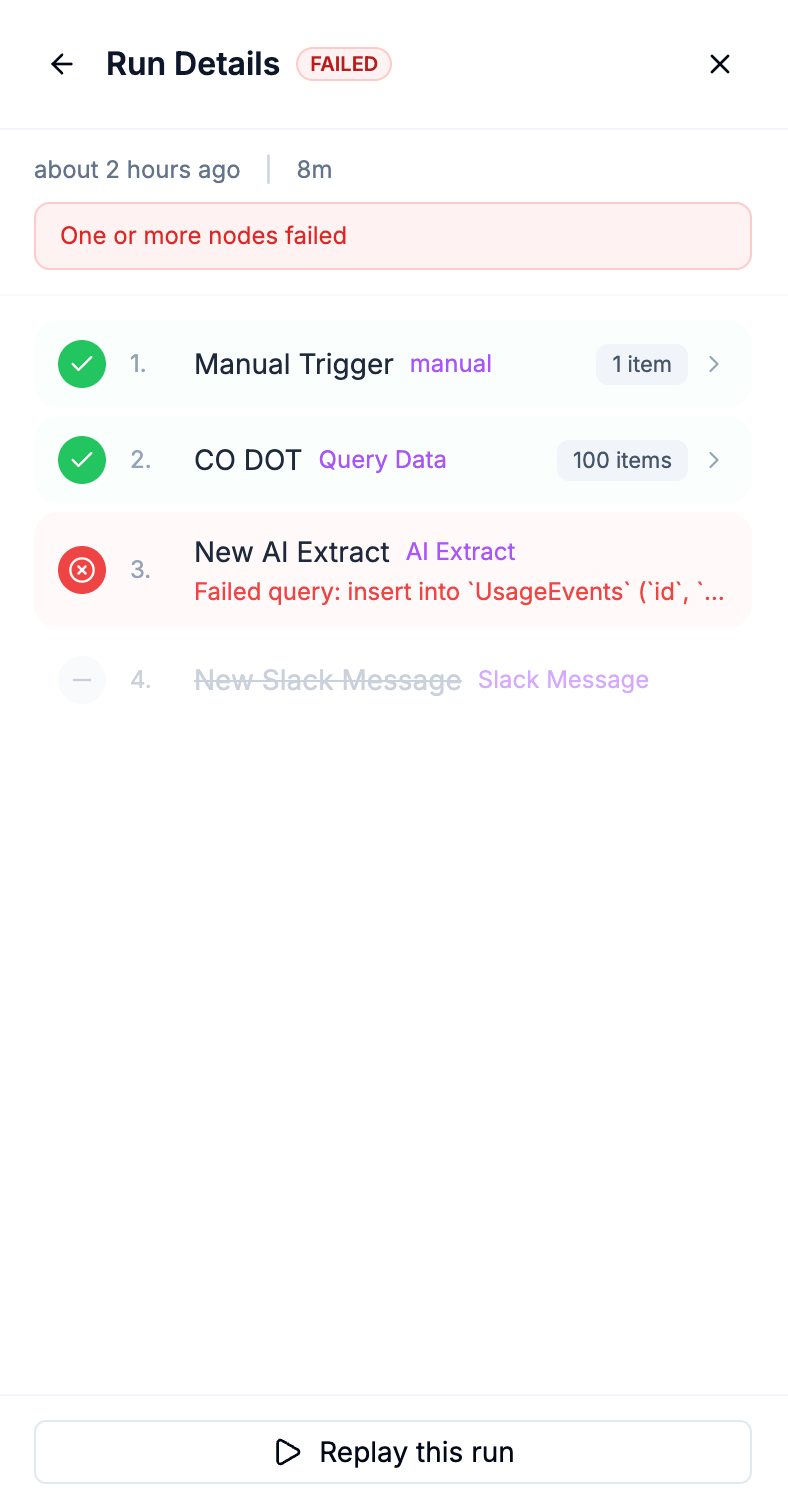
If a workflow fails at a specific node — a Slack integration timed out, a document search returned no results, an AI extraction encountered an unexpected format — you can see exactly where it broke and why. No black boxes. Every node's status, input, and output is recorded.
This turns workflows from "set and forget" into "set, monitor, and improve." Over time, your workflows get better because you have the data to optimize them — which conditions are too broad, which AI steps are most valuable, where the bottlenecks appear.
How Workflows Connects to the Rest of CLEATUS
Workflows isn't a standalone tool. It's deeply integrated with every layer of the platform:
Auto Capture feeds the triggers. AI-matched opportunities arrive and workflows process them automatically — your team wakes up to analyzed, scored, and routed opportunities instead of a raw list.
Contract Breakdown powers the AI nodes. The same OCR-based solicitation scanning and Uniform Contract Format structuring is available as a workflow step.
Document Hub provides context. Workflow nodes that search for past performance, pricing models, or capability statements query the same centralized library your proposal team uses.
AI Proposal Suite benefits from workflow outputs. When a workflow has already extracted the solicitation structure, identified evaluation criteria, and pulled relevant past performance, the proposal writer starts from a richer foundation.
Pipeline management stays current automatically. Phase changes, member assignments, and log notes created by workflows keep your pipeline accurate without manual updates.
Getting Started
Workflows is available now for all CLEATUS users.
Activate a template. Browse the template library and activate a workflow that matches a process you're currently doing manually. Automated Go/No-Go triage is the most popular starting point — it delivers immediate value with minimal setup.
Watch it run. Let the workflow execute on real opportunities. Check the run history. See what the AI extracted, what actions fired, and whether the routing matched your expectations.
Customize. Add conditions, change notification channels, insert AI steps, remove what you don't need. Every template is fully editable.
Build from scratch. When you're comfortable with the node types, create a workflow that automates something uniquely yours — a lead gen process, a color team kickoff sequence, a competitive monitoring routine. The visual builder makes it transparent and editable. No code to maintain, no configurations to debug.
If your process changes — and in GovCon, it will — your workflows change with it.
Stop Working Around Your Tools. Start Automating Your Actual Process.
Every hour your team spends on operational overhead — monitoring portals, triaging opportunities, pulling pricing data, chasing reviewers, searching award databases for leads, updating pipeline status — is an hour they're not spending on the strategic work that wins contracts and closes deals.
CLEATUS Workflows gives that time back. Not by imposing a new process, but by automating the one you already have — with AI that understands GovCon, data that's already in the platform, and visibility that lets you trust the automation and improve it over time.
Your capture process. Your BD workflow. Your review cycle. Your lead gen strategy. Automated, with AI doing the heavy lifting.
Get Started and build a workflow for your actual process.
Frequently asked questions
Further Reading
- Stop Prompt Engineering. Start Winning Contracts.
- 10 AI Prompts to Decode Any Government Solicitation in 30 Minutes
- FPDS Is Gone. Here's How Smart Contractors Are Accessing Government Contract Data Now.
- DIBBS Explained: How to Find and Win DLA Contracts Through the Defense Logistics Agency's Bid Board
- DIBBS Software for DLA Contracts and Batch Quotes
Customer Stories
- How D2 Government Solutions Tripled Growth Without Adding Staff
- How Operation Hired Achieved 6× Proposal Output with CLEATUS AI
- How MST Maritime Quadrupled Proposal Output with CLEATUS AI
- How a Veteran-Owned Shop Won Their First Contract with CLEATUS AI
About CLEATUS
CLEATUS is an AI-powered government contracting platform that helps contractors find opportunities, analyze requirements, track competitors, and win more contracts — at a fraction of traditional capture costs. We aggregate federal, state, local, and city opportunities; our GovCon Copilot analyzes solicitations and your internal documents to deliver actionable market intelligence that drives revenue growth.


