
NSN Lookup
Search more than 17 million National Stock Numbers (NSNs) in the DLA parts catalog, and see the approved sources, the competition status, and the DIBBS solicitations for each part.
The free CLEATUS NSN Lookup searches the Defense Logistics Agency (DLA) parts catalog. The catalog has more than 17 million National Stock Numbers (NSNs). Each part page shows what the item is and who DLA approves to supply it. It also shows the solicitations on the DLA Internet Bid Board System (DIBBS) that asked for the part. You do not need an account.
How to read an NSN
An NSN has 13 digits, for example 5305-00-984-6215:
- The first 4 digits are the Federal Supply Class (FSC). The FSC groups the item with items of the same kind. The first 2 digits of the FSC are the Federal Supply Group (FSG).
- The last 9 digits are the National Item Identification Number (NIIN). The NIIN makes the part unique.
Search the catalog
- Open the NSN directory.
- In the search box, type an NSN, a NIIN, a manufacturer part number, or an item name. Then click Search parts.
- Read the results. Each card shows the NSN, the competition status, the item name, the class, the approved sources, and the part numbers.
- Open a part to see its full page.
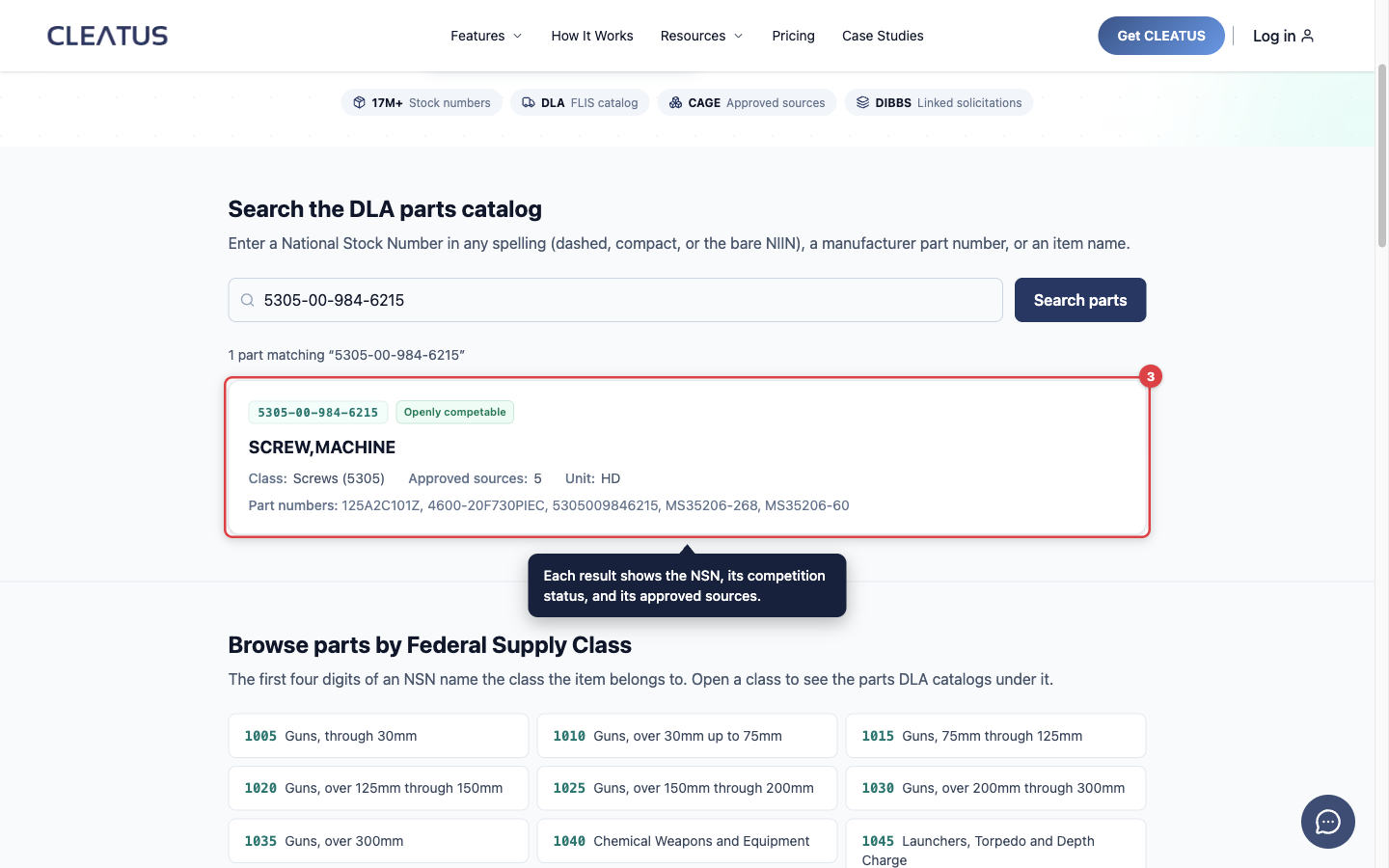
You can type the number in any format. A dashed NSN (5305-00-984-6215), a compact NSN (5305009846215), and a bare NIIN (009846215) all find the same part.
Without a search, the directory lists only the parts that have at least one approved source. A search finds every matching part, with or without an approved source.
Browse by supply class
Under Browse parts by Federal Supply Class, click a class to list its parts. On a part page, click Browse this class or Browse this group. These links list the other parts in the same FSC or FSG.
What a part page shows
The header shows the NSN, the item name, the NIIN, and the FSC. The page has these tabs:
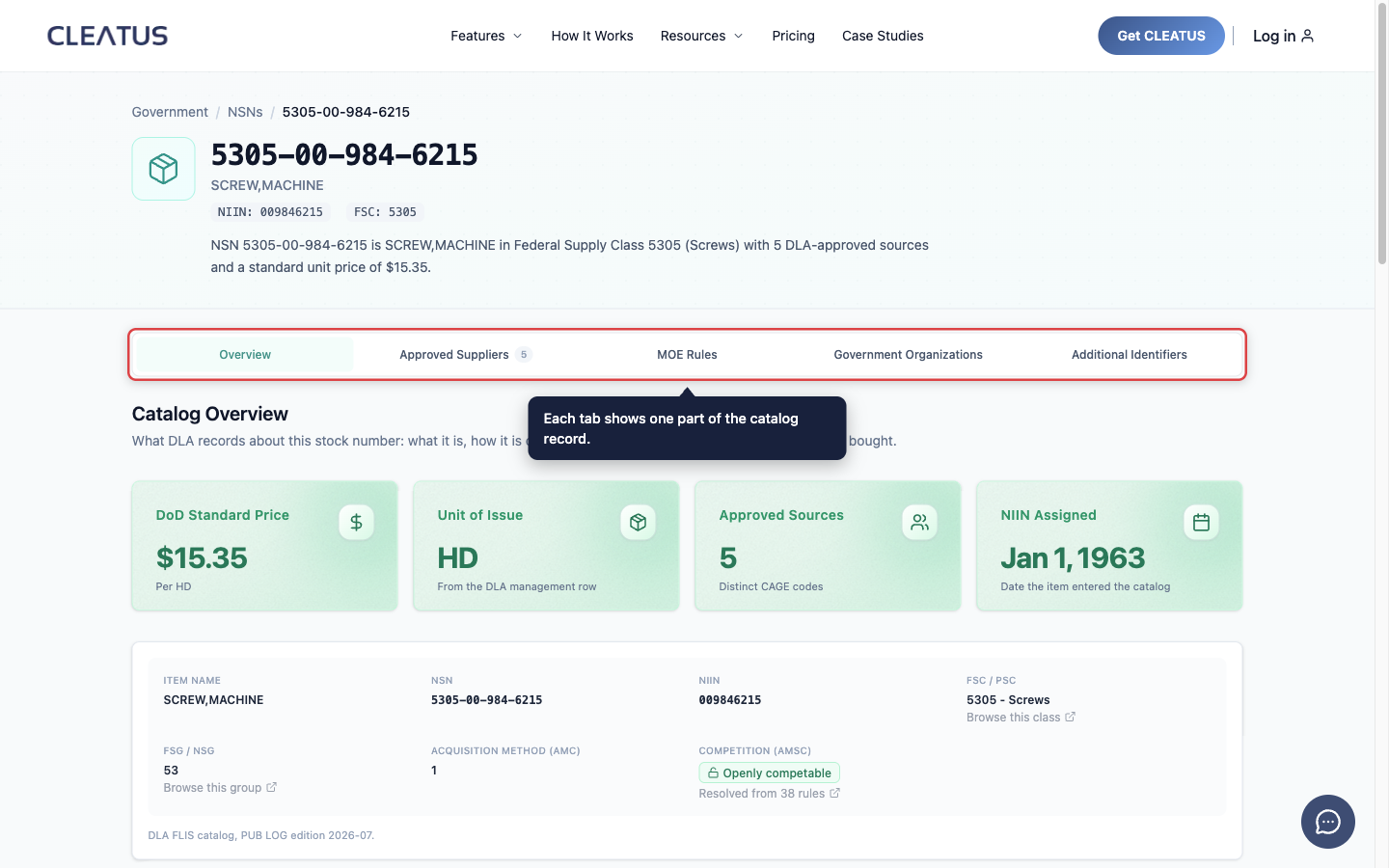
- Overview: four tiles show the DoD Standard Price, the Unit of Issue, the Approved Sources, and NIIN Assigned. DoD is the Department of Defense. NIIN Assigned is the date that the item entered the catalog. Below the tiles, the tab shows the FSC, the FSG, the Acquisition Method Code (AMC), and the competition status.
- Approved Suppliers: the companies that DLA lists as approved sources. Each row shows the Commercial and Government Entity (CAGE) code and the part numbers. A supplier links to its contractor profile when CLEATUS has a matching record. This tab shows only when the part has an approved source.
- MOE Rules: the acquisition rule that each Major Organizational Entity (MOE) records for the part. A military service is one example of an MOE.
- Government Organizations: the stocking and pricing data that each managing organization records.
- Additional Identifiers: other DLA codes for the part, such as the criticality code and the demilitarization (DEMIL) code.
- DIBBS Opportunities: the DIBBS solicitations that asked for the part. Click a row to open the full notice. This tab shows only when a solicitation exists.
- Awards and Pricing: the award notices for the part. When DLA awards a solicitation, its row moves from DIBBS Opportunities to this tab. This tab shows only when an award exists.
Openly competable or approved source only
The competition status comes from the Acquisition Method Suffix Code (AMSC). Each part shows one of three labels:
- Openly competable: the AMSC is G. The government holds full rights to the technical data, so any capable supplier can quote. The approved-source list shows past suppliers. It does not limit who can bid.
- Approved source only: the technical data is restricted. DLA accepts quotes only from the approved CAGE codes. To quote, you must first become an approved source, and that process takes time.
- Competition not stated: DLA did not publish a usable AMSC. Treat the part as unknown, not as restricted.
A part can have rules from more than one MOE. The Overview tab shows one resolved AMSC, and the MOE Rules tab shows each rule behind it.
Find the parts that a company supplies
To see every part that one company is approved to supply, open its profile in the contractor directory. The Approved Supplier tab lists the parts. This tab shows only when DLA lists the company as an approved source.
Free access
You can search the directory and open part pages without an account. NSN pages have no view limit.
Use NSNs in CLEATUS
In the CLEATUS dashboard, open Market Intelligence > NSNs to search the same catalog. The dashboard adds a filter sidebar:
- Supply Class (FSC) and Supply Group (FSG).
- AMSC and AMC.
- Approved Source (CAGE): type one 5-character CAGE code to list the parts that the company is approved to supply.
- Has an approved source: list only the parts that have at least one approved source. This filter is on by default when you browse without a search or another filter.
GovCon Copilot can look up a part for you and read its AMSC and approved sources. It can also find the DIBBS solicitations that list your CAGE code as an approved source.
Or just ask CLEATUS
Look up NSN 5305-00-984-6215. Is it openly competable, and who are the approved sources?
Related: Researching a part for DIBBS, Contractor Search Tool, and Government Intelligence Hub.